Introduction
As data engineers, you may feel like AI is doing all the coding for you. Completely depending on LLMs for coding can be especially worrisome if you are starting out or a few years into your data career.
If you are worried about
Stability of your data career
Being unable to design data systems from scratch
Deteriorating Python and DE skills
Not having the opportunity to build an intuition for data architecture without doing it yourself.
This post is for you! Imagine being able to rapidly create well-architected Python data pipelines. Using LLMs to generate & test code while you drive the design is the future of data engineering.
In this post, we will go over how to quickly design data pipelines. You will see how understanding the fundamentals remains critical to your career and how to leverage that understanding to build resilient pipelines much faster than ever before.
By the end of this post, you will have learned how to quickly go from transformation logic to fully functioning code, leveraging human design and LLM code generation.
Setup
Install uv and set up your environment, as shown below.
# Install Python 3.14
uv python install 3.14

# Create a virtual environment using Python 3.14
uv venv --python 3.14

# Activate it (Linux/Mac)
source .venv/bin/activate
# Or on Windows .venv\Scripts\activate

# Install packages
uv pip install jupyterlab jupyterlab-quarto quarto

# Run JupyterLab
jupyter lab
Create a new IPython notebook and copy-paste the code in this post to run it.
Prerequisites
Read the following links:
Steps to Quickly Design and Build Data Pipelines with LLMs
Before you start designing a data pipeline, ensure that you have the following information.
- Clear requirements defining output characteristics, SLAs, data source, data validations, etc
- The pipeline design depends on the type of processing snapshot/incremental, the transformation logic, and the source availability.
Let’s assume, for our pipeline, that we are extracting data from open URLs, joining them, and writing the results to a local filesystem. In addition, we will implement a tracker system to log the number of input and output rows.
Pipeline code does two specific things
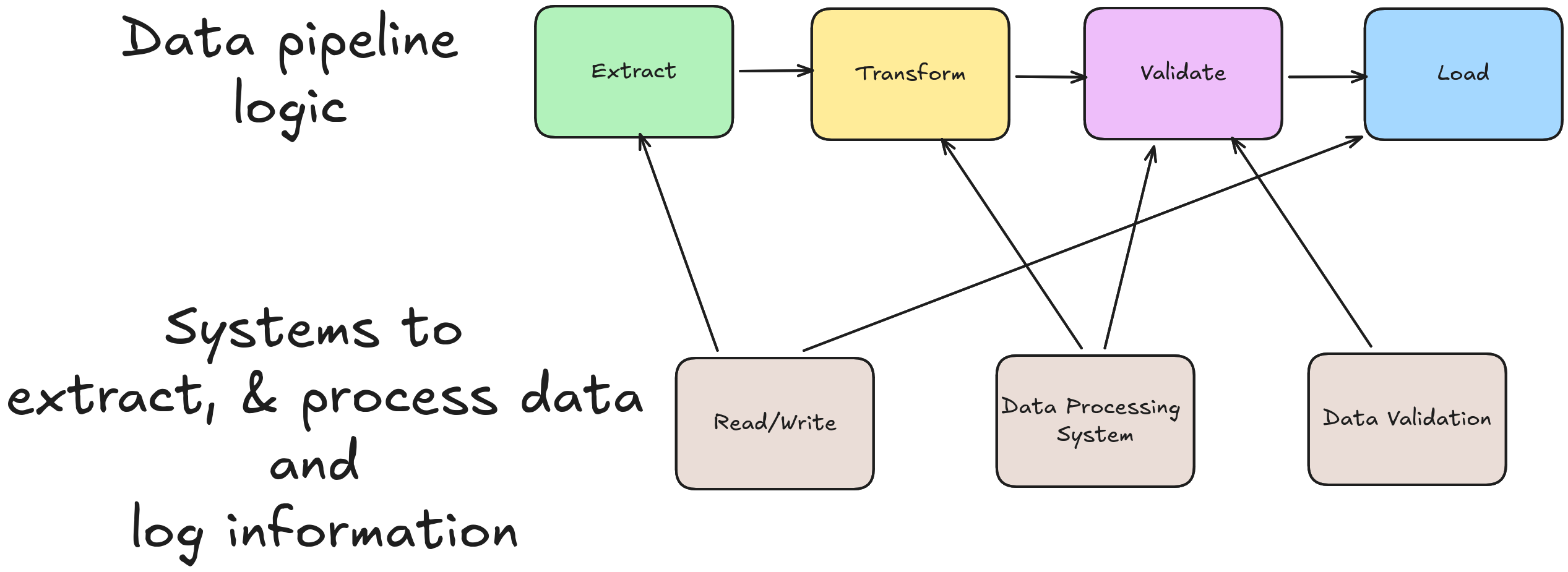
Setup Systems to Run Data Pipeline: Data Processor, Logging, and Maintenance
Most companies will have a standard set of systems to run their data pipelines.
Read/Write system: Define systems that can read from sources and write to destinations. E.g., SparkSession enables you to read from and write to a variety of sources, requests to load data from API, etc.Data Processing system: Unless you are using native Python to process data, you’d need to use a data system to process your data. This can be Spark, Snowflake, Polars, Postgres, etc. You will need to create an object that enables you to use the data system to process data.logging system: You will need an object to represent how to log information for debugging and auditing.
Let’s list out the systems we are going to use for our pipeline:
- Read/Write: We will use Polars, pl.read_* and pl.write_* to read and write respectively.
- Data Processing System: We will use Polars, so a global import polars as pl will suffice.
- Logging System: We will use the standard Python logger as shown below. The logger will be defined as a global variable and will be used across the functions in the data processing script.
import logging

from pathlib import Path

# Ensure logs directory exists before configuring file handler
Path("./logs").mkdir(parents=True, exist_ok=True)

# Configure global logger
logging.basicConfig(
    level=logging.INFO,
    format="%(asctime)s - %(name)s - %(levelname)s - %(message)s",
    handlers=[
        logging.StreamHandler(),
        logging.FileHandler("./logs/pipeline.log", mode="a"),
    ],
)
logger = logging.getLogger("etl_pipeline")
Note For a quick primer on Polars, read this.
Let’s assume we also want to include functionality to log the row counts of data inputs and output from every pipeline.
Since this functionality is shared across multiple pipelines, we can create a class for it. Before writing the code, let’s go over the functionality we need from this class.
- Logs data to a file with the columns:
timestamp_utc,pipeline_name,run_id,dataset_name,metric,value. Where metric can be any metric to be logged, and value represents its value. - Instantiate the class with a local file path as an input argument. This is the file to which the log data is written in csv format.
- Method to insert a metric and a value into the log file.
log_countmethod that accepts input of typeDict[str, pl.DataFrame]and logs their count into the log file.
Feed this description into an LLM prompt and generate the following code. Here is my LLM prompt and code.
"""
DataFrameTracker: A utility class for logging metrics to a CSV file.
"""

import csv
import os
from datetime import datetime, timezone
from typing import Dict, Any
import polars as pl


class DataFrameTracker:
    """
    A class to track and log metrics related to data pipelines.

    Logs data to a CSV file with columns:
    timestamp_utc, pipeline_name, run_id, dataset_name, metric, value

    # Example usage
    import uuid

    # Create sample DataFrames
    df1 = pl.DataFrame({
        "id": [1, 2, 3],
        "name": ["Alice", "Bob", "Charlie"]
    })

    df2 = pl.DataFrame({
        "product_id": [101, 102, 103, 104, 105],
        "price": [9.99, 19.99, 29.99, 39.99, 49.99]
    })

    # Initialize tracker
    tracker = DataFrameTracker(
        file_path="logs/pipeline_metrics.csv",
        pipeline_name="data_ingestion",
        run_id=str(uuid.uuid4())
    )

    # Log individual metrics
    tracker.log_metric("users", "processing_time_ms", 150)
    tracker.log_metric("users", "null_count", 0)

    # Log DataFrame counts
    dataframes = {
        "users": df1,
        "products": df2
    }
    tracker.log_count(dataframes)
    """

    COLUMNS = ["timestamp_utc", "pipeline_name", "run_id", "dataset_name", "metric", "value"]

    def __init__(self, file_path: str, pipeline_name: str, run_id: str):
        """
        Initialize the DataFrameTracker.

        Args:
            file_path: Path to the CSV file where logs will be written.
            pipeline_name: Name of the pipeline being tracked.
            run_id: Unique identifier for this pipeline run.
        """
        self.file_path = file_path
        self.pipeline_name = pipeline_name
        self.run_id = run_id

        self._initialize_file()

    def _initialize_file(self) -> None:
        """Create the log file with headers if it doesn't exist."""
        if not os.path.exists(self.file_path):
            os.makedirs(os.path.dirname(self.file_path), exist_ok=True) if os.path.dirname(self.file_path) else None
            with open(self.file_path, mode="w", newline="") as f:
                writer = csv.writer(f)
                writer.writerow(self.COLUMNS)

    def _get_timestamp(self) -> str:
        """Get the current UTC timestamp in ISO format."""
        return datetime.now(timezone.utc).isoformat()

    def log_metric(self, dataset_name: str, metric: str, value: Any) -> None:
        """
        Log a single metric and value to the file.

        Args:
            dataset_name: Name of the dataset this metric relates to.
            metric: Name of the metric being logged.
            value: Value of the metric.
        """
        row = [
            self._get_timestamp(),
            self.pipeline_name,
            self.run_id,
            dataset_name,
            metric,
            value
        ]

        with open(self.file_path, mode="a", newline="") as f:
            writer = csv.writer(f)
            writer.writerow(row)

    def log_count(self, dataframes: Dict[str, pl.DataFrame]) -> None:
        """
        Log the row count of each DataFrame in the dictionary.

        Args:
            dataframes: Dictionary mapping dataset names to Polars DataFrames.
        """
        for dataset_name, df in dataframes.items():
            count = df.height
            self.log_metric(dataset_name, "row_count", count)
While the above prompt → code may seem to remove the need for foundational skills, deeper inspection shows that foundational skills are always critical.
In the prompt, we clearly define
[Data Model]Output format timestamp_utc,pipeline_name,run_id,dataset_name,metric,value, which requires one to understand data storage patterns.[OOP]file_path as a Class variable[Data Model]Generalizing count logger to any metric logger, using key,value columns[OOP]Functionality of the log_count method and its input signature
This shows that foundational SWE principles, such as data modeling and OOP design, are critical; LLMs automate the manual coding.
Let’s see what LLMs generate when we don’t prompt them with specifics, using this prompt: Create a Python Class to log metrics.
Generated code, here you can see a bunch of features that have no use for our specific system or have so much random functionality.
With LLM code generation, the key is specificity.
Define How to Process the Data, AKA Data Pipeline Logic
The core data pipeline logic includes
Extraction: Identify where you are extracting the data from and whether any filters are needed (e.g., a specific S3 path corresponding to a time, a data filter such as updated_at > now - 12h, API query params, etc.).Transformation: Clearly define the transformation logic at a SQL-like level. Defining logic at a SQL-like level will ensure accurate code generation. SQL-like logic also enables you to clearly define the transformations (& any non-standard data manipulation) specific to your data.Validation: Define the DQ checks to run to ensure your data is fit for consumption by stakeholders. Read the types of data validations here.Load: Define how your data will be loaded into the destination. Will it be a full overwrite, partition-based overwrite, insert, or upsert
The Extract-Transform-Validate-Load pattern is commonly used in data pipelines. Note that the function docstring (generated with autoDocString) includes SQL-like logic for the transformation method.
import polars as pl

def extract() -> Dict[str, pl.DataFrame]:
    """Function to extract data from source URLs.
    Returns:
        Dict[str, pl.DataFrame]: Dictionary with key representing dataset name and value as its Polars Dataframe
    """
    supplier_url = "https://gist.githubusercontent.com/josephmachado/85f5c8d73ac840906cce590f657ffb06/raw/8d9d29b1466d49abc9dbf09b21d508f7a1071e69/your_file.csv"

    nation_url = "https://gist.githubusercontent.com/josephmachado/4c48d64b7dcbbdb419cd6181e7c562c1/raw/068c121f30d9ccb64e26b979bb730902990618b1/nation.csv"

    pass

def transform(input_dataframes: Dict[str, pl.DataFrame], tracker: DataFrameTracker) -> pl.DataFrame:
    """Function to transform input data into the output data.
    The transformation logic is
    1. Inner join supplier to nation on s_nationkey = n_nationkey
    2. Upper case s_name
    3. Select s_name as supplier_name, s_phone as supplier_phone_number, n_name as supplier_nation

    Args:
        input_dataframes (Dict[str, pl.DataFrame]):  Dictionary with key representing input dataset name and value as its Polars Dataframe

    Returns:
        pl.DataFrame: Output Dataframe
    """
    pass


def validate(dataframe_to_validate: pl.DataFrame) -> bool:
    """Function to run data validation checks.
    The validation logic is (run checks independently)
    1. Check if supplier_name is unique
    2. Check if the count of distinct supplier_nation is less than 25

    Args:
        dataframe_to_validate (pl.DataFrame): The dataframe to be validated

    Returns:
        bool: True if all validations pass, else false
    """
    pass

def load(dataframe_to_load: pl.DataFrame, destination_path: Path) -> None:
    """Function to write a dataframe to the destination.
    This function will typically have logic to overwrite/insert/upsert. In this function, we overwrite the
    destination_path with the dataframe_to_load

    Args:
        dataframe_to_load (pl.DataFrame): The validated dataframe to be loaded into its destination
    """
    pass

def run_pipeline() -> None:
    """Main function to run the complete ETL pipeline."""
Let’s use LLMs to generate the code. Here is the LLM prompt I used
import polars as pl
import logging
from datetime import datetime
from pathlib import Path
from typing import Dict

# Ensure logs directory exists before configuring file handler
Path("./logs").mkdir(parents=True, exist_ok=True)

# Configure global logger
logging.basicConfig(
    level=logging.INFO,
    format="%(asctime)s - %(name)s - %(levelname)s - %(message)s",
    handlers=[
        logging.StreamHandler(),
        logging.FileHandler("./logs/pipeline.log", mode="a"),
    ],
)
logger = logging.getLogger("etl_pipeline")


def extract() -> Dict[str, pl.DataFrame]:
    """Function to extract data from source URLs.

    Returns:
        Dict[str, pl.DataFrame]: Dictionary with key representing dataset name and value as its Polars Dataframe
    """
    logger.info("Starting data extraction")

    supplier_url = "https://gist.githubusercontent.com/josephmachado/85f5c8d73ac840906cce590f657ffb06/raw/8d9d29b1466d49abc9dbf09b21d508f7a1071e69/your_file.csv"
    nation_url = "https://gist.githubusercontent.com/josephmachado/4c48d64b7dcbbdb419cd6181e7c562c1/raw/068c121f30d9ccb64e26b979bb730902990618b1/nation.csv"

    try:
        supplier_df = pl.read_csv(supplier_url)
        logger.info(f"Successfully extracted supplier data: {len(supplier_df)} rows")

        nation_df = pl.read_csv(nation_url)
        logger.info(f"Successfully extracted nation data: {len(nation_df)} rows")

        return {
            "supplier": supplier_df,
            "nation": nation_df
        }
    except Exception as e:
        logger.error(f"Failed to extract data: {str(e)}")
        raise


def transform(input_dataframes: Dict[str, pl.DataFrame], tracker: DataFrameTracker) -> pl.DataFrame:
    """Function to transform input data into the output data.

    The transformation logic is:
    1. Inner join supplier to nation on s_nationkey = n_nationkey
    2. Upper case s_name
    3. Select s_name as supplier_name, s_phone as supplier_phone_number, n_name as supplier_nation

    Args:
        input_dataframes (Dict[str, pl.DataFrame]): Dictionary with key representing input dataset name and value as its Polars Dataframe

    Returns:
        pl.DataFrame: Output Dataframe
    """
    logger.info("Starting data transformation")

    try:
        # Log input row counts
        tracker.log_count(input_dataframes)

        supplier_df = input_dataframes["supplier"]
        nation_df = input_dataframes["nation"]

        # Step 1: Inner join supplier to nation on s_nationkey = n_nationkey
        joined_df = supplier_df.join(
            nation_df,
            left_on="s_nationkey",
            right_on="n_nationkey",
            how="inner"
        )
        logger.info(f"Joined dataframes: {len(joined_df)} rows")

        # Step 2 & 3: Upper case s_name and select required columns
        transformed_df = joined_df.select([
            pl.col("s_name").str.to_uppercase().alias("supplier_name"),
            pl.col("s_phone").alias("supplier_phone_number"),
            pl.col("n_name").alias("supplier_nation")
        ])

        logger.info(f"Transformation complete: {len(transformed_df)} rows")
        # Log transformed data count
        tracker.log_count({"transformed": transformed_df})

        return transformed_df

    except Exception as e:
        logger.error(f"Failed during transformation: {str(e)}")
        raise


def validate(dataframe_to_validate: pl.DataFrame) -> bool:
    """Function to run data validation checks.

    The validation logic is (run checks independently):
    1. Check if supplier_name is unique
    2. Check if the count of distinct supplier_nation is less than 25

    Args:
        dataframe_to_validate (pl.DataFrame): The dataframe to be validated

    Returns:
        bool: True if all validations pass, else false
    """
    logger.info("Starting data validation")

    validation_passed = True

    try:
        # Check 1: supplier_name is unique
        total_rows = len(dataframe_to_validate)
        unique_supplier_names = dataframe_to_validate["supplier_name"].n_unique()

        if total_rows != unique_supplier_names:
            logger.error(f"Validation failed: supplier_name is not unique. Total rows: {total_rows}, Unique names: {unique_supplier_names}")
            validation_passed = False
        else:
            logger.info(f"Validation passed: supplier_name is unique ({unique_supplier_names} unique names)")

        # Check 2: distinct supplier_nation count < 25
        distinct_nations = dataframe_to_validate["supplier_nation"].n_unique()

        if distinct_nations >= 25:
            logger.error(f"Validation failed: distinct supplier_nation count is {distinct_nations}, expected less than 25")
            validation_passed = False
        else:
            logger.info(f"Validation passed: distinct supplier_nation count is {distinct_nations} (less than 25)")

        if validation_passed:
            logger.info("All validation checks passed")
        else:
            logger.warning("Some validation checks failed")

        return validation_passed

    except Exception as e:
        logger.error(f"Failed during validation: {str(e)}")
        raise


def load(dataframe_to_load: pl.DataFrame, destination_path: Path) -> None:
    """Function to write a dataframe to the destination.

    This function will typically have logic to overwrite/insert/upsert. In this function, we overwrite the
    destination_path with the dataframe_to_load

    Args:
        dataframe_to_load (pl.DataFrame): The validated dataframe to be loaded into its destination
    """
    logger.info(f"Starting data load to {destination_path}")

    try:
        # Ensure parent directory exists
        destination_path.parent.mkdir(parents=True, exist_ok=True)

        # Write dataframe to CSV (overwrite mode)
        dataframe_to_load.write_csv(destination_path)

        logger.info(f"Successfully loaded {len(dataframe_to_load)} rows to {destination_path}")

    except Exception as e:
        logger.error(f"Failed to load data to {destination_path}: {str(e)}")
        raise


def run_pipeline() -> None:
    """Main function to run the complete ETL pipeline."""
    logger.info("=" * 60)
    logger.info("Starting ETL pipeline")
    logger.info("=" * 60)

    try:
        # Initialize tracker
        tracker = DataFrameTracker(
            file_path="./logs/pipeline_metrics.csv",
            pipeline_name="supplier_etl_pipeline",
            run_id=f"run_{datetime.now().strftime('%Y%m%d_%H%M%S')}"
        )

        # Extract
        input_data = extract()

        # Transform
        transformed_data = transform(input_data, tracker)

        # Validate
        is_valid = validate(transformed_data)

        if not is_valid:
            logger.error("Pipeline validation failed. Stopping execution.")
            raise ValueError("Data validation failed")

        # Load
        destination = Path("./output/supplier_data.csv")
        load(transformed_data, destination)

        logger.info("=" * 60)
        logger.info("ETL pipeline completed successfully")
        logger.info("=" * 60)

    except Exception as e:
        logger.error("=" * 60)
        logger.error(f"ETL pipeline failed: {str(e)}")
        logger.error("=" * 60)
        raise


if __name__ == "__main__":
    run_pipeline()
Add Integration and Unit Tests
We have generated a lot of code with LLMs, but we have not verified that they work as expected. Create integration and unit tests to ensure the code behaves as expected.
See this post on how to use Pytest to add code tests to your pipeline.
Conclusion
To recap, we saw
- How to quickly set up systems required to run data pipelines
- How to define data transformation and generate code with LLM
The main takeaways from this post are 1. By defining proper design and the right data structures, LLMs can significantly speed up data pipeline creation. 2. Understanding the fundamentals will help you build faster, more effective pipelines with LLMs.
As a next step, learn Python fundamentals and use this article to build elegant data pipelines fast!
The next time you are building a data pipeline, use this guide to help you design elegant pipelines while leveraging the speed of LLMs to generate code.