flowchart TD
    A[Vendor?] -->|Y| B[Check file sizes if you notice read performance drop]
    A -->|N| C[Stream ingestion?]
    C -->|Y| D[Schedule a maintenance job]
    C -->|N| E[You control the pipeline code?]
    E -->|Y| F[Can the pipeline afford extra runtime?]
    E -->|N| D
    F -->|Y| H[Run maintenance function as part of pipeline]
    F -->|N| D
Introduction
Large datasets are stored as individual files. Many small files per dataset make reads expensive!
You might be wondering.
Why are too many small files a problem? & How to identify this issue on Spark UI?
If there’s a strategy to prevent creating tiny files in the first place
Is it practical to consolidate them through an independent process? If yes, how?
Imagine being able to set up systems to create optimally sized files.
Ensure you don’t get pinged by stakeholders: “Hey, this data is slow, can you check?”
By the end of this post, you will know how to detect and fix the problem of small files.
If you don’t have a vendor, run the rewrite_data_files function
If you have a vendor, they take care of fixing the small files problem.
If not, you can use the Iceberg function rewrite_data_files in your pipeline or as a scheduled manitenance pipeline.
Code Setup
Follow along with code using this setup instructions.
We use Apache Iceberg in this post, but the concepts apply to delta as well.
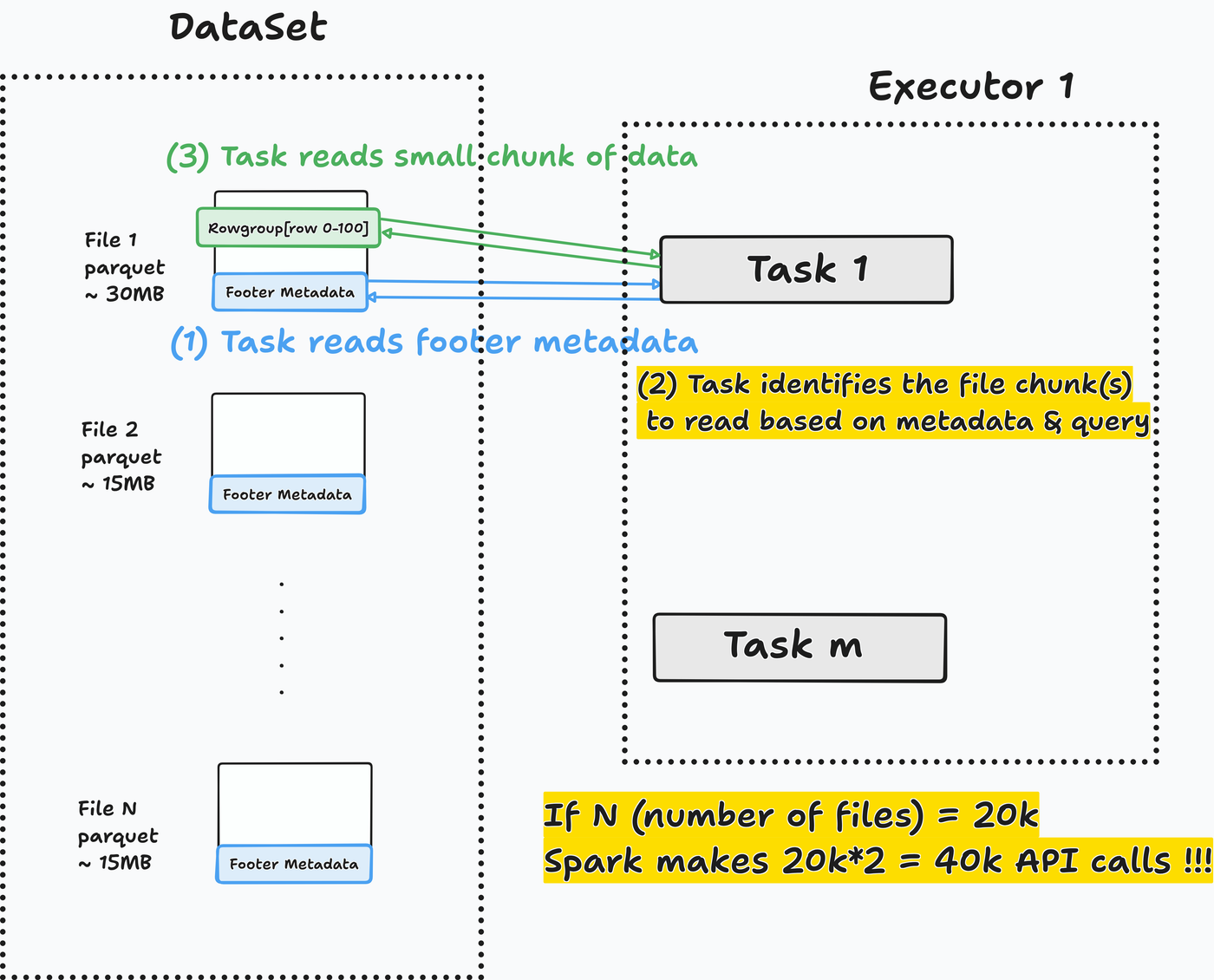
Many small files => Spark wastes time opening them
Spark excels at processing large data. Opening many small files wastes compute time ($$$).
For each file to read, Spark will:
- Read parquet footer
metadata. - Identify the
data chunk to read, based on metadata and the query to run. Read the required data chunkfrom the parquet file.
Let’s run a query to check how it performs.
- 1
- SQL magic to run Spark SQL
Go to the SQL/DataFrame tab in the Spark UI at http://localhost:4040 and select the first read stage.
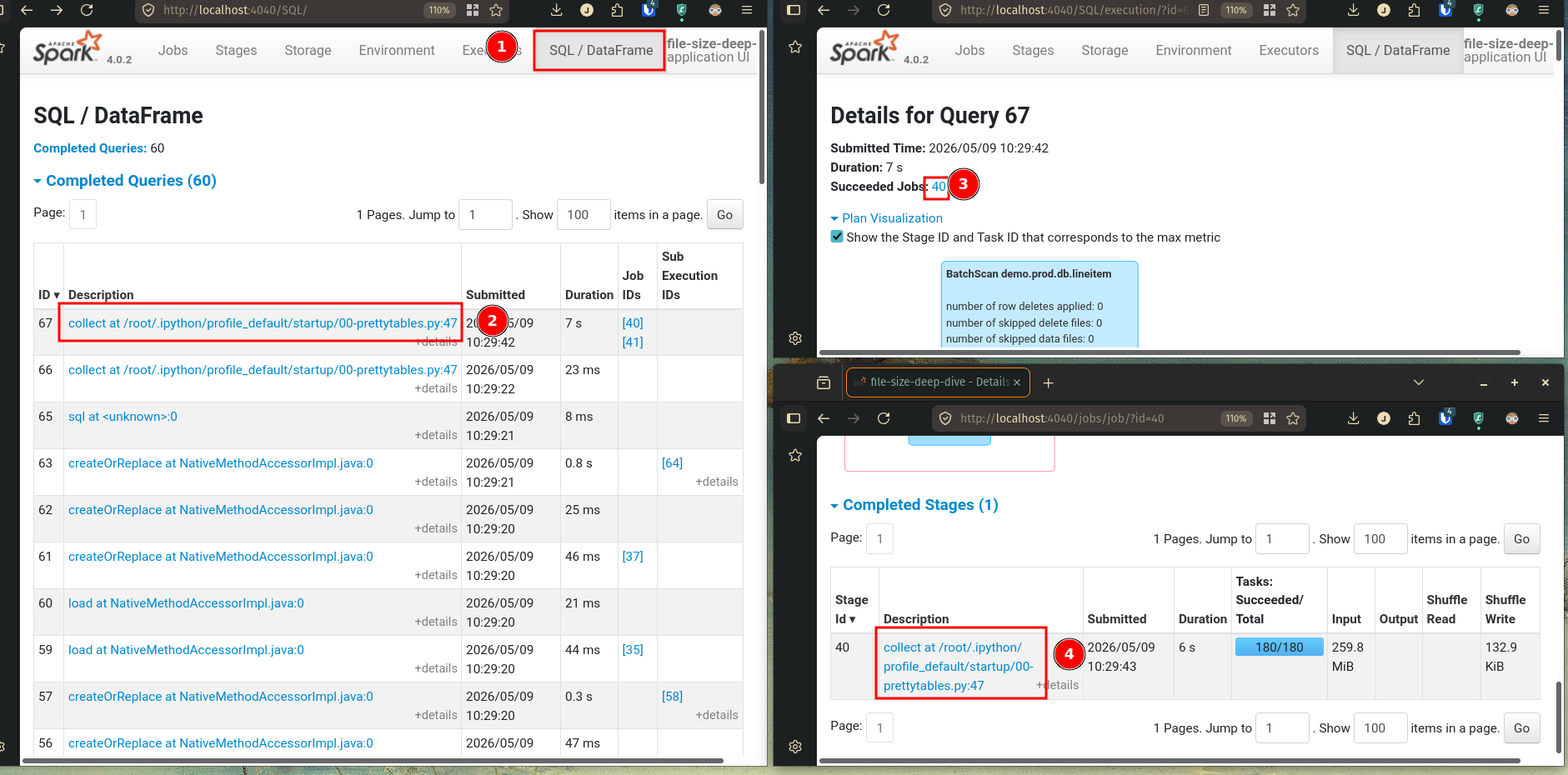
In the stages tab, click on event timeline. Many small tasks (1 task = 1 green chunk) indicate a many-small-files (or partitions) problem.
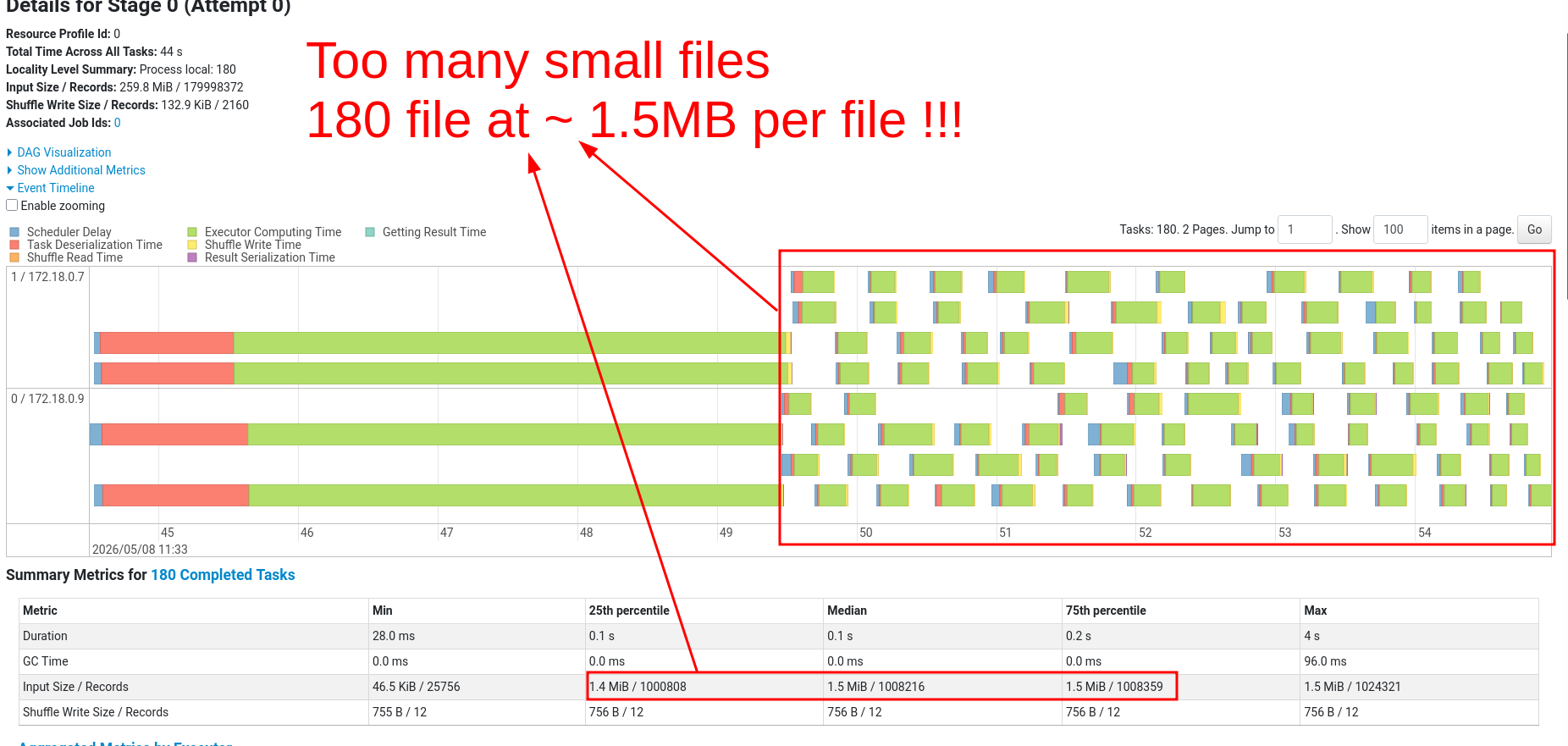
1.5MB is the average input size, from the summary section. This is tiny!
Recommended optimal file size is between 512MB and 1GB.
The rewrite_data_files function is the simplest fix
Table format maintenance functions combine small files into optimally sized files.
- Apache Iceberg has rewrite_data_files
- Delta Lake has optimize
Let’s see how rewrite_data_files works.
- 1
- Create a new table
The maintenance function combines small files into optimally sized files (default size: 512 MB).
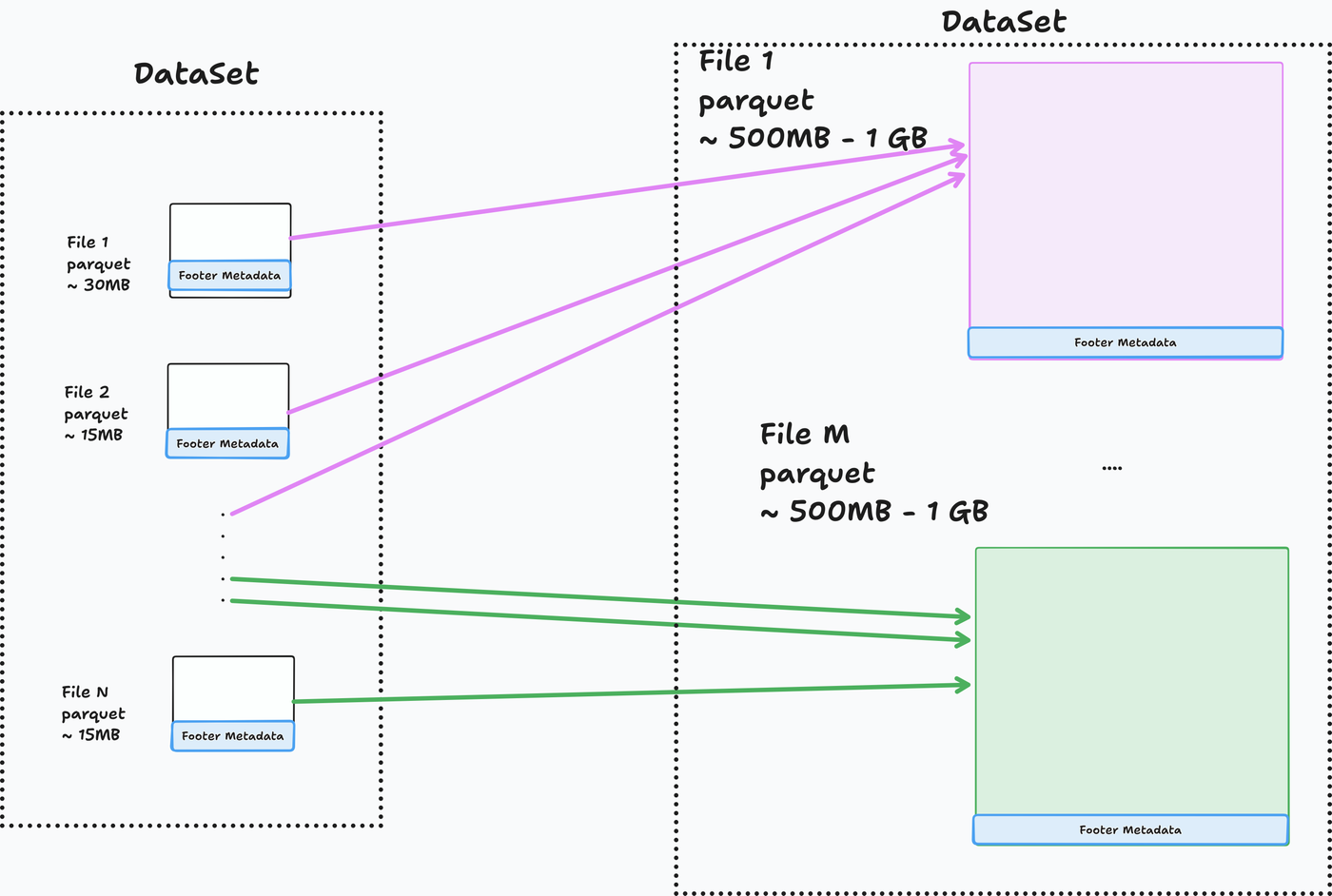
Now Spark can concentrate on processing the data.
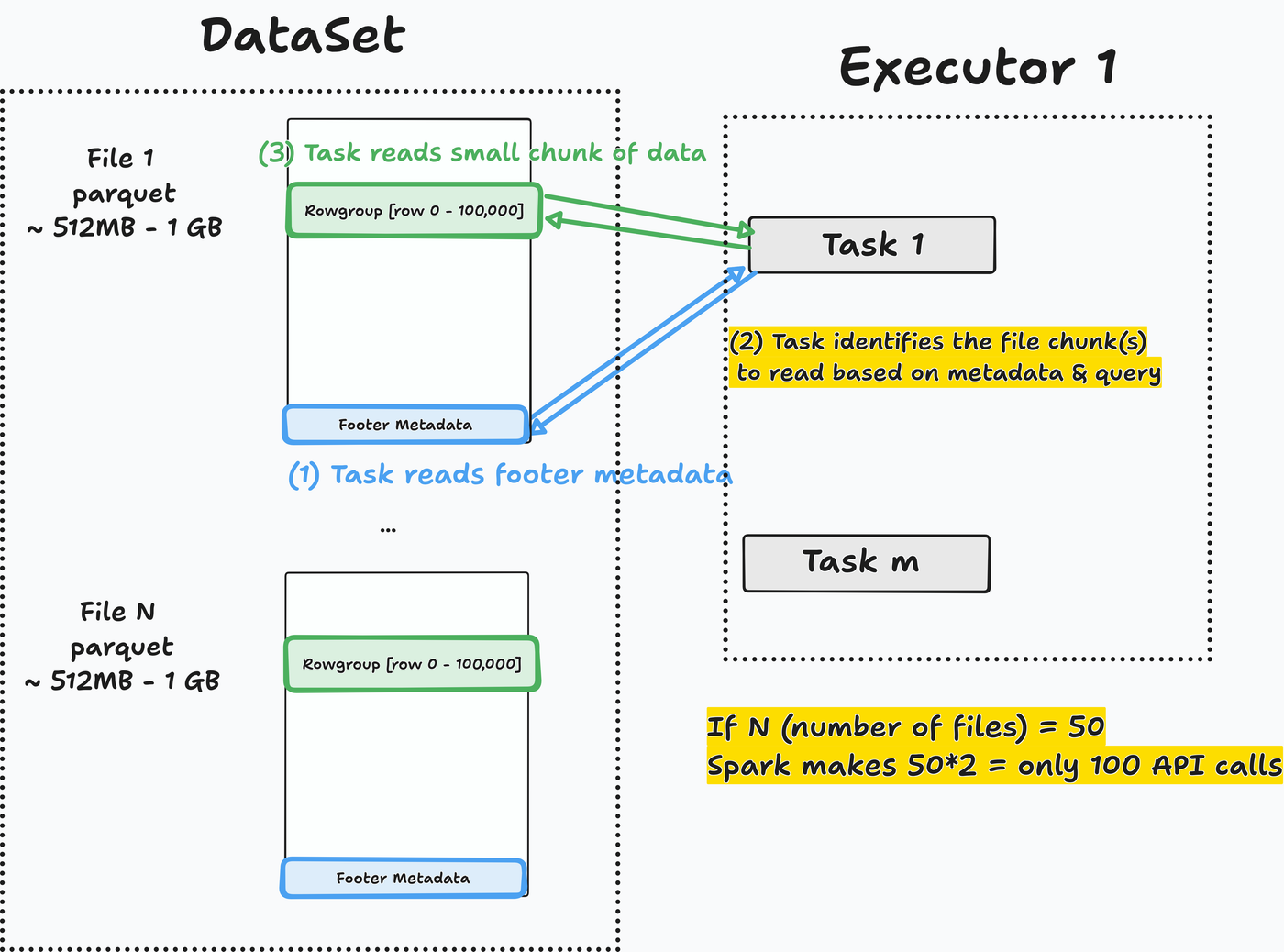
Re-trying our query on the optimized table.
Go to the SQL/DataFrame tab in the Spark UI at http://localhost:4040 and select the first read stage for this job.
In the Stages tab, we can see the task event time for longer-running tasks.
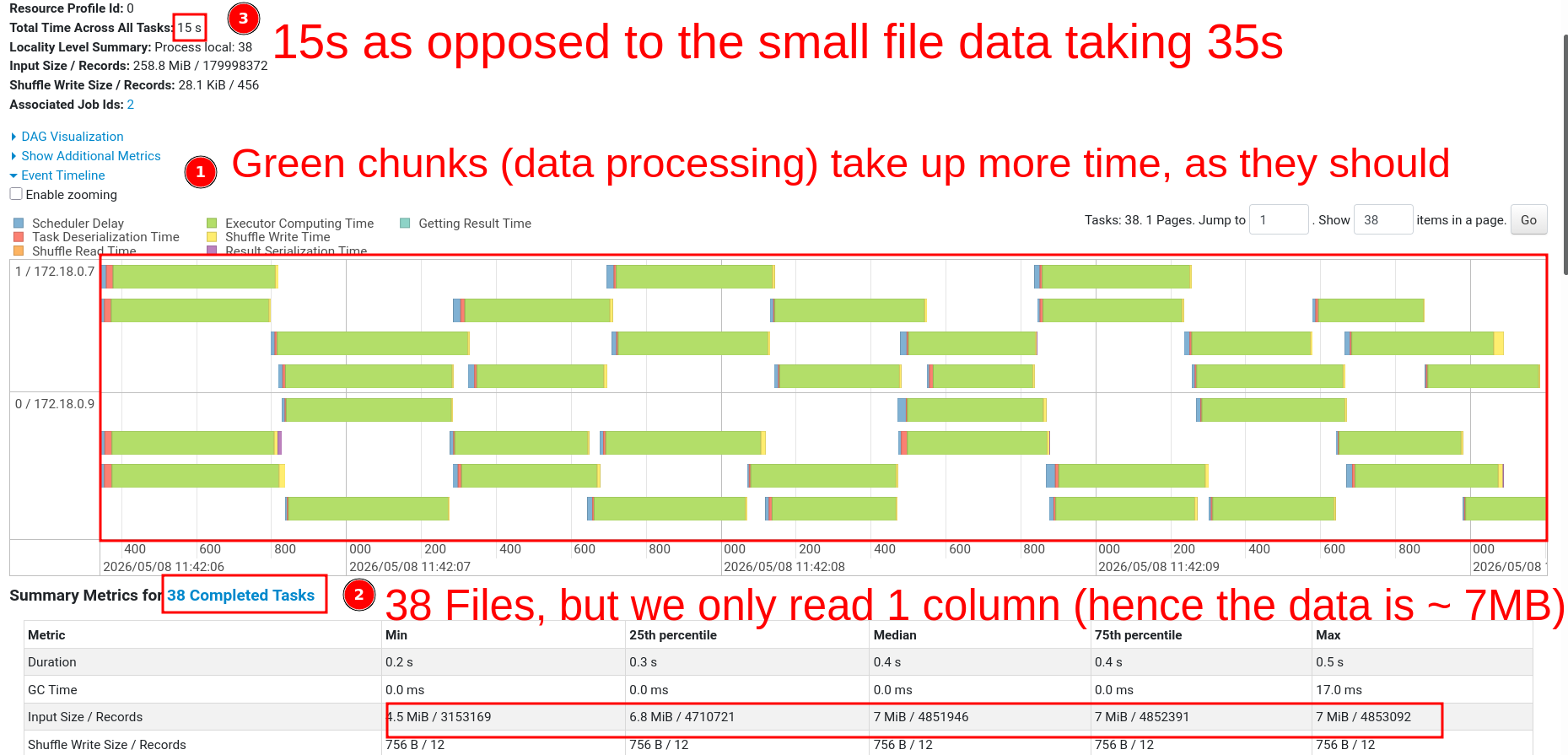
Processing time dropped by 67% (45s → 15s).
Note
If you don’t own the pipeline or can’t afford a longer runtime, schedule a maintenance job. When possible, run maintenance as part of ETL.
The maintenance function includes an option to target only specific partitions. And an optional sort order when optimizing file sizes (docs).
E.g., run a daily maintenance function targeting files inserted only in the prior day.
Partition data before insert
Inserting into a partitioned table does not guarantee optimal file size
Let’s see if inserting data into partitioned tables will write files of optimal size.
%%sql
CREATE TABLE
  IF NOT EXISTS prod.db.lineitem_part_year (
    l_orderkey BIGINT,
    l_partkey BIGINT,
    l_suppkey BIGINT,
    l_linenumber INT,
    l_quantity DECIMAL(15, 2),
    l_extendedprice DECIMAL(15, 2),
    l_discount DECIMAL(15, 2),
    l_tax DECIMAL(15, 2),
    l_returnflag STRING,
    l_linestatus STRING,
    l_shipdate DATE,
    l_commitdate DATE,
    l_receiptdate DATE,
    l_shipinstruct STRING,
    l_shipmode STRING,
    l_comment STRING
  ) USING iceberg PARTITIONED BY (YEAR (l_shipdate)) TBLPROPERTIES (
    'format-version' = '2'
);- 1
- print_file_sizes is a function we define at setup
| # | file_path | file_size_mb | writer_task |
|---|---|---|---|
| 1 | .../l_shipdate_year=1994/...00001-00001.parquet |
99.98 | 219 |
| 2 | .../l_shipdate_year=1994/...00002-00001.parquet |
100.00 | 220 |
| 3 | .../l_shipdate_year=1993/...00003-00001.parquet |
100.01 | 206 |
The Iceberg writer task only allows ~384 MB (ref)of memory before writing data to the output file. This is set with the property spark.sql.iceberg.advisory-partition-size.
Writing to parquet results in 4x compression (data-dependent), so 384 MB in-memory becomes a 100 MB file.
There may be cases where the 384 MB goes to multiple partitions (thus, file sizes will be smaller than 100 MB)
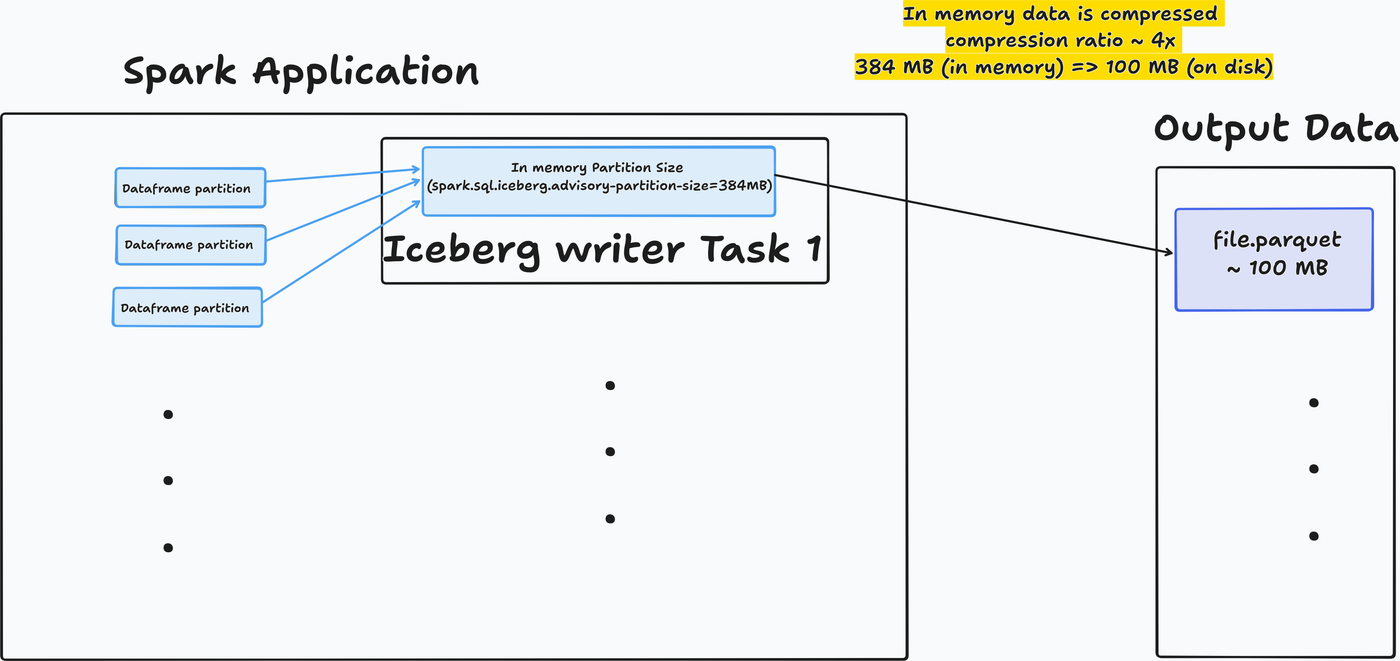
Check out the input size (~350 MB) to output size (~100 MB) in the task metrics section of the stages tab.
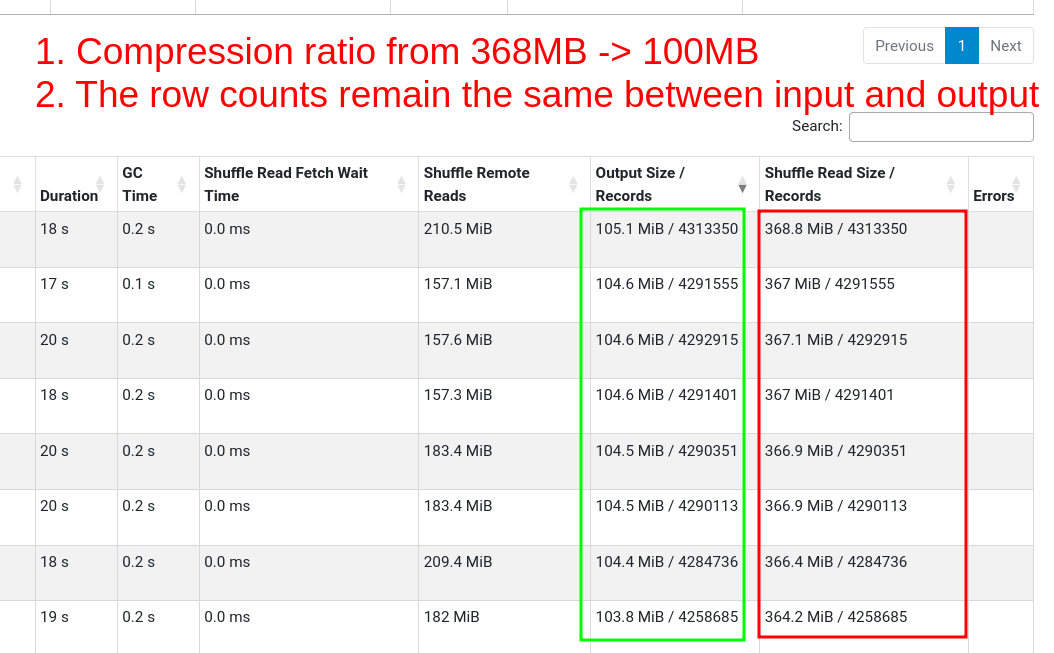
Increasing task memory does not guarantee optimal file size
Let’s try with 2GB task memory. Assuming 4x compression, the output files should be ~500 MB.
%%sql
CREATE TABLE
IF NOT EXISTS prod.db.lineitem_part_year_2gb_intask_mem (
l_orderkey BIGINT,
l_partkey BIGINT,
l_suppkey BIGINT,
l_linenumber INT,
l_quantity DECIMAL(15, 2),
l_extendedprice DECIMAL(15, 2),
l_discount DECIMAL(15, 2),
l_tax DECIMAL(15, 2),
l_returnflag STRING,
l_linestatus STRING,
l_shipdate DATE,
l_commitdate DATE,
l_receiptdate DATE,
l_shipinstruct STRING,
l_shipmode STRING,
l_comment STRING
) USING iceberg PARTITIONED BY (YEAR (l_shipdate)) TBLPROPERTIES (
'format-version' = '2',
'write.spark.advisory-partition-size-bytes' = '2147483648'
);- 1
- Setting in-memory size to 2 GB
- 1
- print_file_sizes is a function we define at setup
| # | file_path | file_size_mb | writer_task |
|---|---|---|---|
| 1 | .../year=1996/00001.parquet |
281.27 | 413 |
| 2 | .../year=1998/00000.parquet |
492.10 | 412 |
| 3 | .../year=1994/00009.parquet |
510.58 | 421 |
| 4 | .../year=1993/00005.parquet |
510.67 | 417 |
Warning
Our executors need sufficient memory to be able to handle the 2GB per task requirement.
Compressions ratios vary depending on your data, experiment.
Output files are mostly optimally sized.
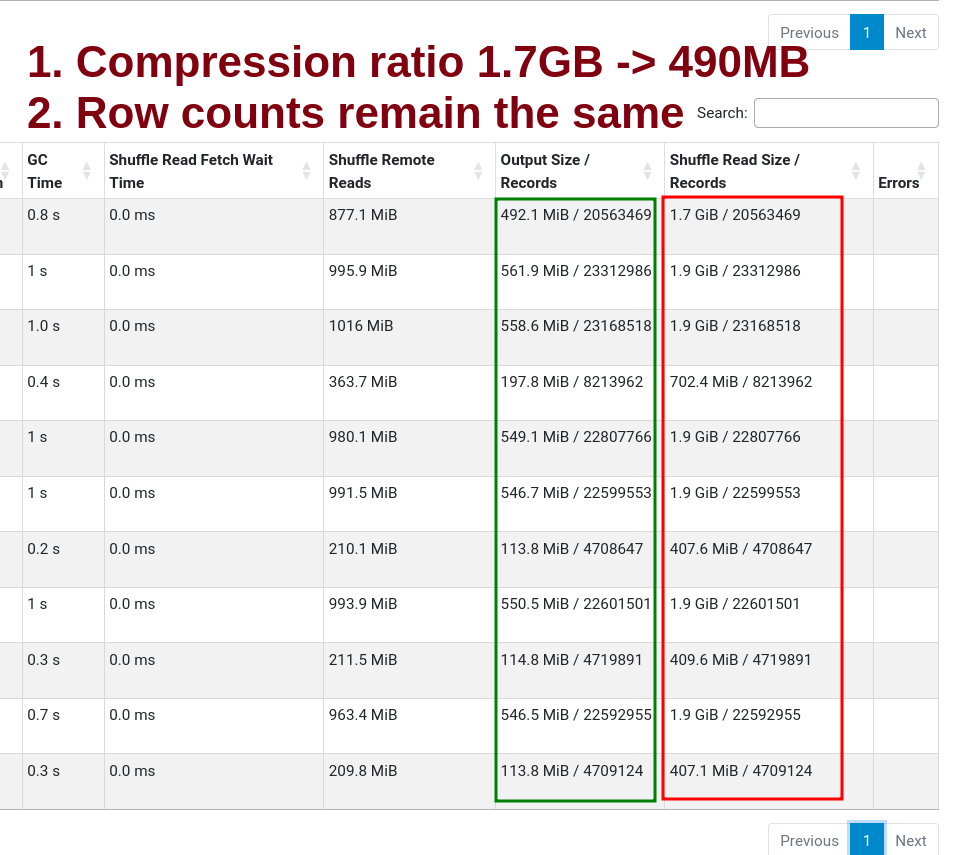
We can see some non-optimal files in the stages tab.
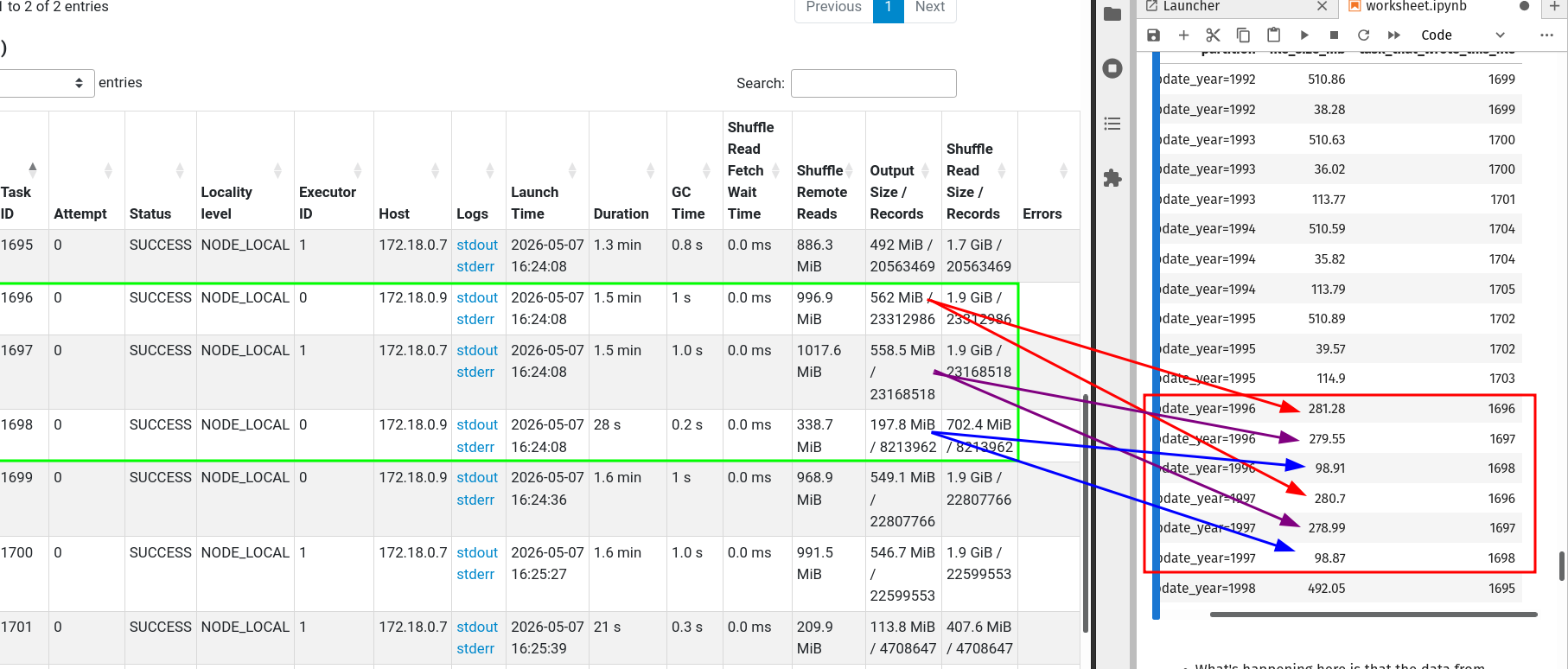
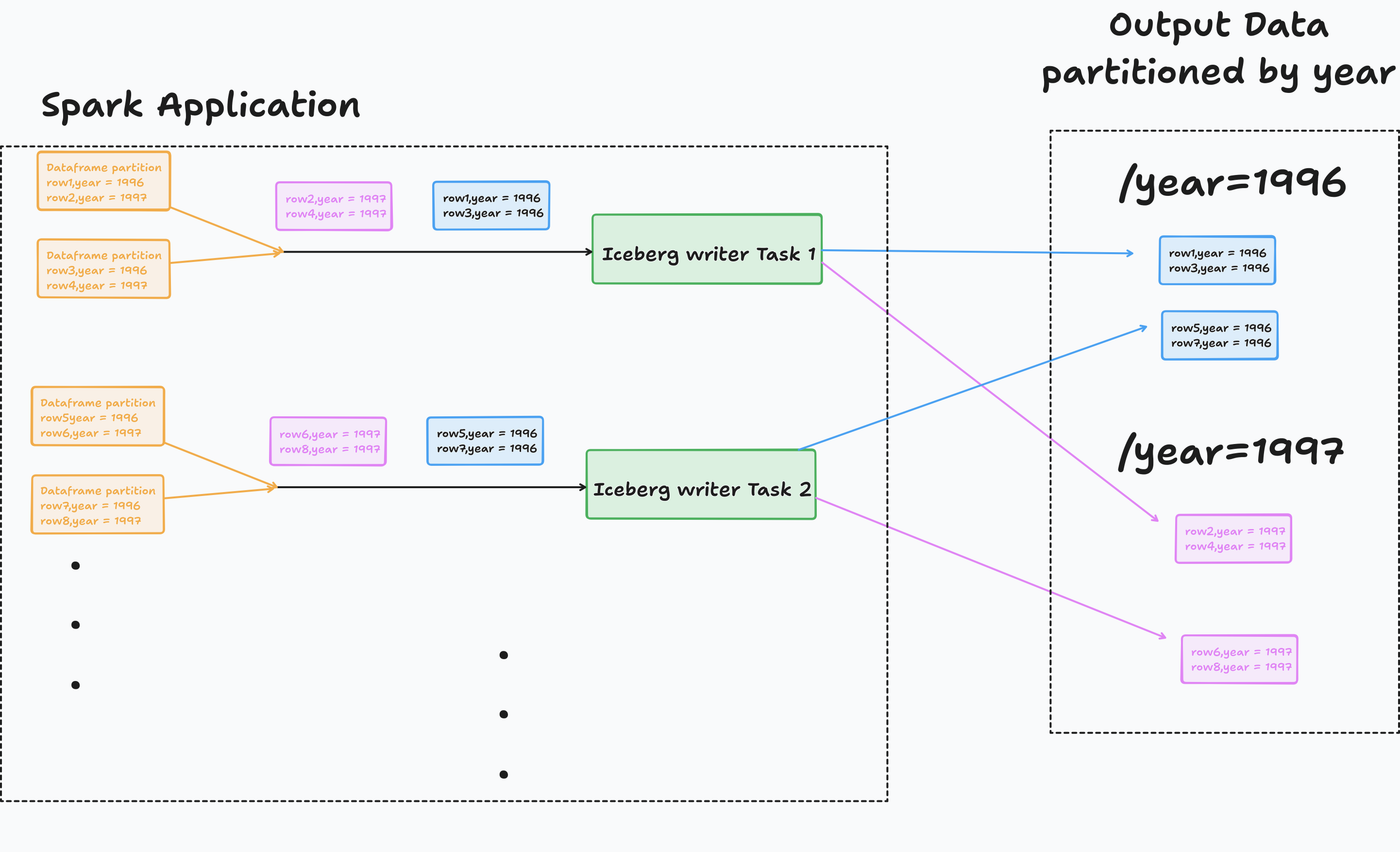
Here is what’s happening.
Rows with different year(l_shipdate) are handled by the same writer, which gets written to separate files, leading to less than optimal file sizes.
Increase task memory and partition before insert
Partitioning before insert will fix this. Let’s see how.
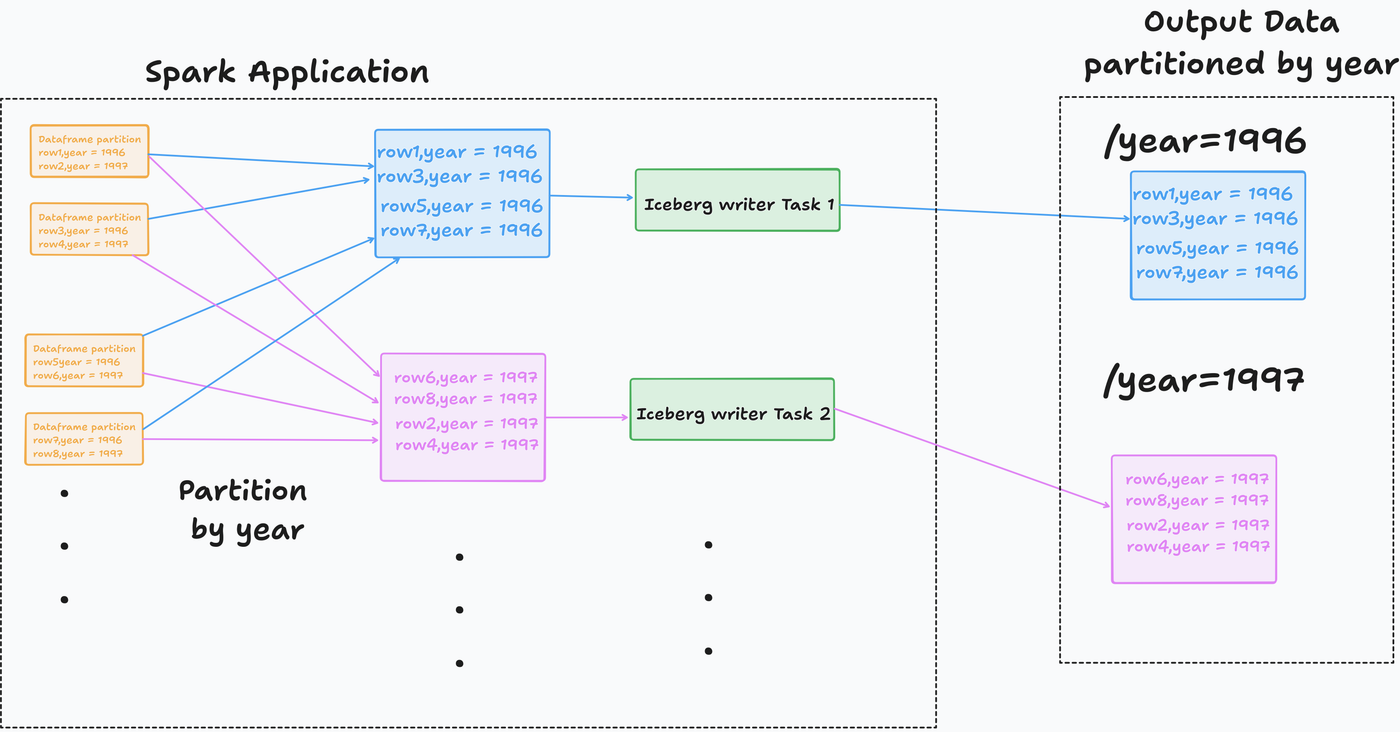
Let’s partition data in Spark and then insert it into the table.
We can see that all the files are optimally sized.
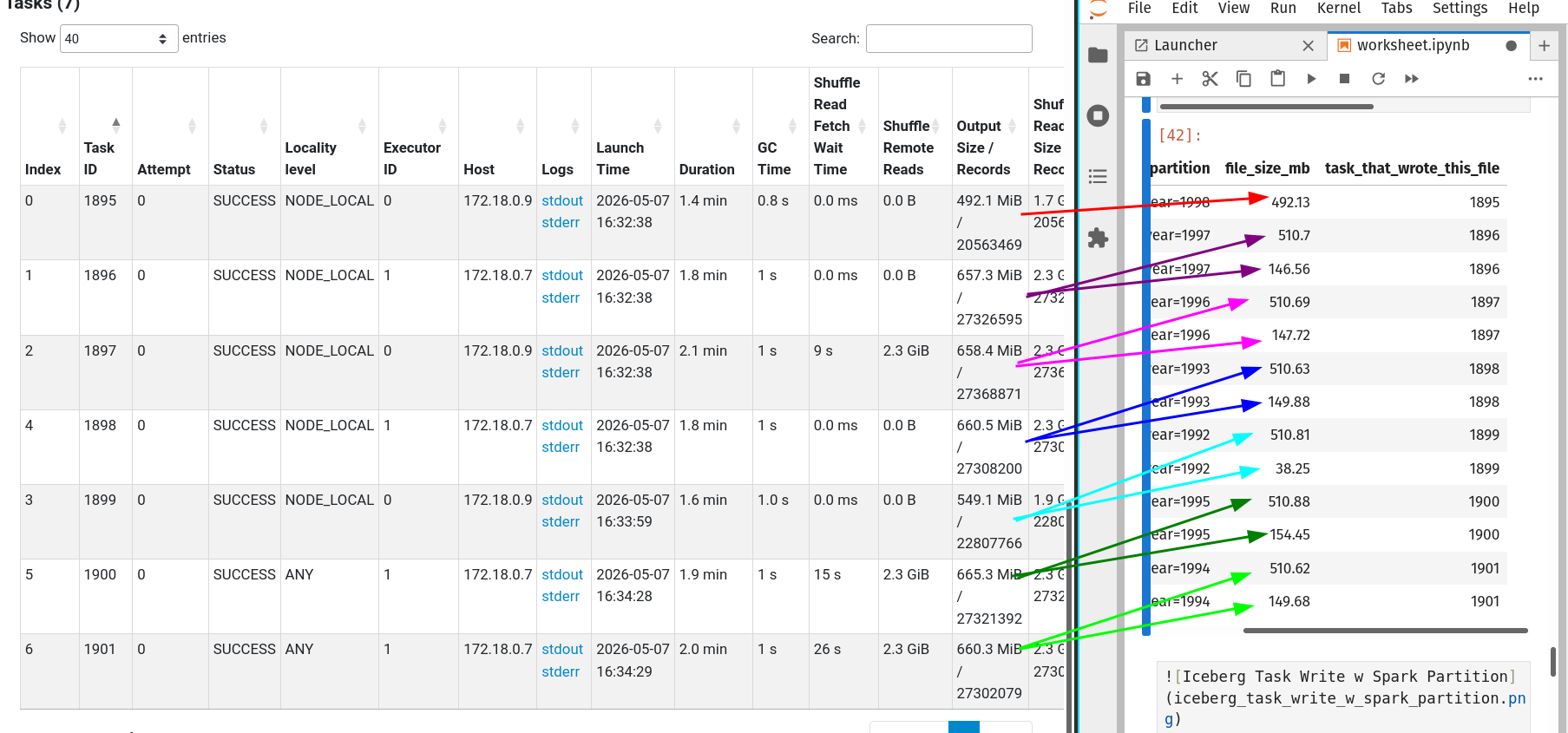
When an output file size exceeds 512MB, the Iceberg writer opens a new file (aka rollover).
Alternatives & future work
An alternative is using sort before writing to the output file. This is beneficial for filters on the sorted column(s) and also creates output files of optimal size.
In Iceberg, this can be done by
- Setting write.distribution-mode to sort.
- Setting a sort-order property
- Sorting with Spark before writing to the output
Warning
Global sorting is extremely expensive as you shuffle and then sort per partition. Sorting is beneficial for columns with high cardinality.
As of Iceberg 1.10.0: “Future work in Spark should allow Iceberg to automatically adjust this (spark.sql.adaptive.advisoryPartitionSizeInBytes) parameter at write time to match the write.target-file-size-bytes.”
Vendors do this (& more)
In addition to file resizing, when using table formats, we need to clean up deleted data (preserved for history) & manifest files.
Vendors like Databricks automate these for you. And vendors like Snowflake have their own representation.
Conclusion
To recap, we saw
- Why are many small files a problem
- Using maintenance functions to optimally size files
- Optimal file sizing how-tos for partitioned tables
- How vendors (mostly) handle it automatically
Choose easy or cheap, you can’t have it both ways (yet). If you have a vendor, they take care of fixing the small files problem.
If not, you can use the Iceberg function rewrite_data_files in your pipeline or as a scheduled manitenance pipeline.
flowchart TD
    A[Vendor?] -->|Y| B[Check file sizes if you notice read performance drop]
    A -->|N| C[Stream ingestion?]
    C -->|Y| D[Schedule a maintenance job]
    C -->|N| E[You control the pipeline code?]
    E -->|Y| F[Can the pipeline afford extra runtime?]
    E -->|N| D
    F -->|Y| H[Run maintenance function as part of pipeline]
    F -->|N| D
Your future self and stakeholders will thank you.
If you found this helpful or learned something new, please share this article on your socials; it really helps.